
This calculator works backward from a lead goal. You tell it how many leads (transactions in sales mode) you want and what an avg ad click costs. It tells you how many clicks you have to buy (based on conversion rate). What those clicks cost, and what you get back when those leads turn into customers.
That order matters. A Google Ads budget isn’t a number you pick out of the air — it’s the price of the clicks you need to hit your goal. Set the goal first and the budget falls out of the math.
These are numbers you already have, or can estimate from your account and your CRM. If you never ran Google ads before, email media@rankfuse.com and we can scedule a meeting.
Avg. Cost-Per-Click (CPC) What you pay for one click. Pull this from your Google Ads account. If you haven’t run ads yet, use Keyword Planner’s top-of-page bid estimates for your main keywords.
Conversion Rate (click-to-lead) The percentage of clicks that turn into a lead — a form fill, a call, a chat, a booked appointment. This comes from your landing page or site analytics. If you don’t have a number, 2–5% is a reasonable starting range for most lead gen.
Close Rate (lead-to-customer) The percentage of leads your sales team turns into paying customers. This comes from your CRM, not a guess. If you’re closing 1 in 4, enter 25.
Lifetime Value (LTV) of a Customer Total revenue from one customer over the life of the relationship — not just the first sale. If a customer buys $500 four times a year for two years, LTV is $4,000, not $500.
Number of Leads Wanted Your goal for the period. This is the input that drives the budget.
You don’t fill these in. They populate when you hit Calculate.
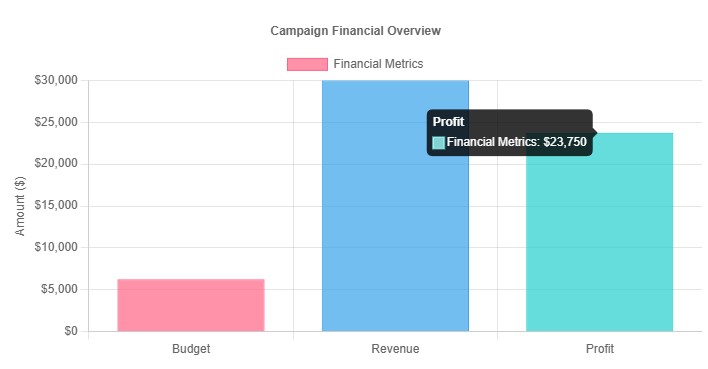
ROAS above 1.0x means revenue exceeds ad spend. That’s a low bar. The calculator measures revenue against media cost only — it doesn’t subtract cost of goods, labor, management fees, or overhead. Set your own target based on your margins. Most businesses need 3x or better before paid search is worth running.
The number to watch is CPA against LTV. If a customer costs $625 to acquire and is worth $3,000, you have room. If CPA gets close to LTV, the campaign works on paper and loses money in practice.
Buying 1,250 ad clicks to get 10 customers may seem strange, but this very average. The math that matters most is spending $6,250 to make $30,000. We have happy clients and case studies that support 4x ROAS based on ecommerce and CRM attribution models.
Change one input at a time and watch what moves.
One thing the calculator can’t tell you: whether there’s enough search volume to buy that many clicks. If the math says you need 1,250 clicks a month and your keywords only get 400 searches, the plan doesn’t work no matter what the budget says. We help you check volume in Keyword Planner before you commit to a buget and strategy.